
So way back in October of 2008, Comcast announced a cap on it’s “unlimited” access of 250GB a month. Now the complaint was, there isn’t any way of tracking this straight out of the box. So many customers went into a frantic rage about there being a cap on “unlimited” internet and there wasn’t anyway to tell if they were going to be charged or not. Comcast assured customers that this cap was well above the average user and most users will never even come close.
Well as of Today, there is. Comcast sent there customers an email with the title “Usage Meter: Pilot Launch”. The basic idea is that it isn’t software that you install on your PC or Mac, but a simple space on your account page that when you log-in, you can access this information under the User and Settings tab. They will even go back and show you over the past three months what you have done, so that you get a basic idea of what you are using. Here is the email:
An important message from Comcast

Dear  Comcast High-Speed Internet Customer,

We  are pleased to announce the pilot launch of the Comcast Usage Meter in  your area. This new feature is available to Comcast High-Speed Internet  customers and provides an easy way to check total monthly household  high-speed Internet data usage at any time. Monthly data usage is the  amount of data, such as images, movies, photos, videos, and other files  that customers send, receive, download or upload each month. Comcast  measures total data usage and does not monitor specific customer  activities to determine data usage.

The  current data usage allowance for the Comcast High-Speed Internet  service is 250GB per month. This means that the vast majority of our  customers – around 99% currently – will not come close to using 250GB of  data in a month, and do not need to check the usage meter.

To  view your current data usage, please visit http://customer.comcast.com and sign in to customerCentral (as shown at http://media2.comcast.net/anon.comcastonline2/support/Outbound_email/usage/cCentral-Login2.jpg).

After signing in, click on the "User  & Settings" tab and click again on "View details" under "My  devices". The usage meter shows the current calendar month's data usage  for your account starting on the 1st of the month. Over time, you will  be able to see the previous three months' data usage as shown in the  sample image at http://media2.comcast.net/anon.comcastonline2/support/Outbound_email/usage/Usage-Meter.jpg.

The usage meter is only available to  Primary user accounts and Unrestricted Secondary user accounts with  billing access.

If you would like to  learn more about the usage meter and how it works, please visit http://networkmanagement.comcast.net/datausagemeter.htm for more information. Please visit our customer support forums at http://forums.comcast.net if you would like to ask us more questions or post comments. You can  also visit http://www.comcastsupport.com/chat to chat with a customer service representative, or call 1-800-COMCAST  for assistance.

Thank you for choosing  Comcast!
So this to me is good way for me to see what it is that I am using. Now from what I can tell, they don’t give you a full detailed break down of your internet traffic, like cell companies do of your calls, but it does give you a graph to see how much traffic you are using month to month. So I was a little intrigued to see what mine is, as I do a lot of YouTube HD, Vimeo HD, Hulu HD (when available) and also Netflix over the XBOX 360, as well as gaming on the XBOX. I was actually kind of worried, because I don’t have cable and watch all of my favorite shows, like 24, over the internet and also watch A LOT of Revision3 shows via Boxee or iTunes. I even have my own podcast that I put up on YouTube as well. So I considered myself an high-usage user to watch all of my video content via the web.
I was pleasantly surprised, that I really don’t even come close (as previously assured by comcast) . Let me show you my screen after I logged in:
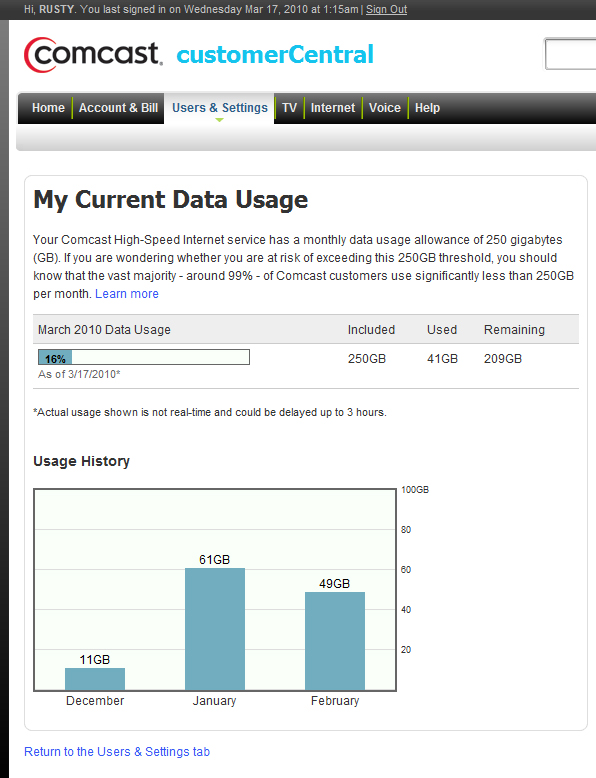
Now in January, apparently I went a little crazy and used 61GB, but February I went back down to 49 and for March, I am trending downward. I think I really need to start downloading my content in a FULL HD quality when I can, instead of streaming it, and try to see if that will make a budge on the meter. With this tool, I will continue to see how I trend, but thanks Comcast for coming up with this tool fashionably late. We shall see how it goes from here!
 The still fairly new FCC chairmen Julius Genachowski is rocking the airwaves brother, and I mean in a good way! At least for the bottom line. Mr. G is trying to make use of the Universal Service Fund(USF) that we all get charged on our phone bills in a new way. Currently, it is used to subsidize the phone lines for low-income households. For an AGING technology. He wants to revamp that to start paying for broadband to the curb for rural areas that we were all promised in the FREAKING 80’S (what happened to all that money AT&T????!!!!). And you begin to hear the cries and sorrows from the AT&T camps already. SHUTUP! At least someone is finally holding you accountable for what you were supposed to do with our money YEARS ago. And don’t even get me started on the whole Net Neutrality thing, that is so far gone off the end of the grand canyon, that’s not even funny. (You should read this horrible article seeming to lean towards the side against Net Neutrality from
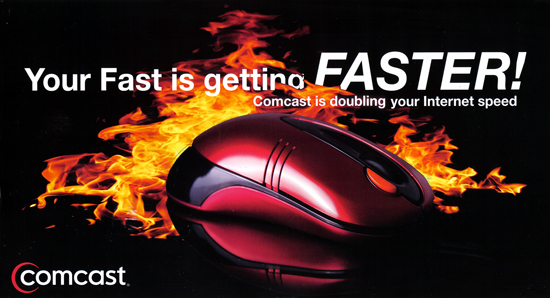
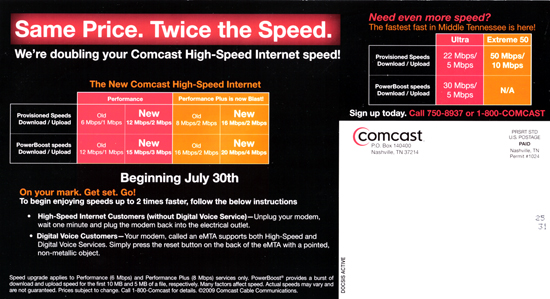 Wow, this is starting to sound like and Apple ad for the 3G iPhone, when it first came out (by the way, I am waiting for the 4G, or 3G2). So as you scan down the page, you can begin to see my excitement!!! Let’s take a closer look:
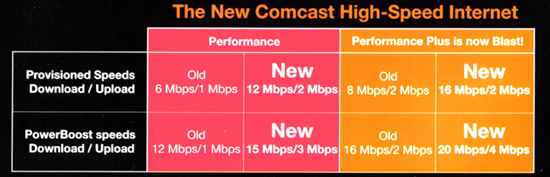 That’s right, the old 6Mbps is now the new 12, and the old 8 is now 16!!!!!! The “PowerBoost” does make it look good with the 20/4 on the new one, but you will only have that for a short time. The thing that caught my attention was this little gem:
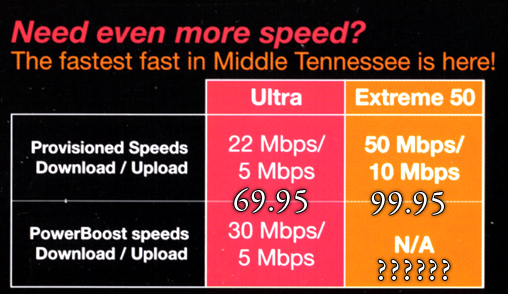 WHAT??!!! ARE YOU SERIOUS??? We are finally catching up to the Asians and Europeans?? Why has this taken so long??? So I called, and asked to be upgraded. Prices first. The smaller of the two is $69.95/month. Which isn’t much compared to what I pay already, which is $67.95, so why not??? I asked for the price of the larger, and it is $99.95/month! I would have gladly paid the price, BUT I just gave up a $132 bill from Comcast for having HSI and HD cable.
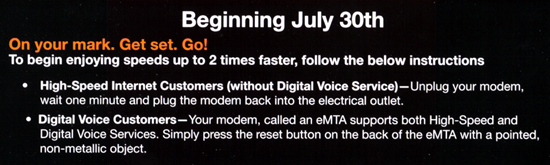 All I had to do to double my speed (to the 16Mbs), was unplug and plug back in. You don’t think I didn’t do that right away!!! Here is a few speed tests that I ran off off DSLreports.com